

Setting a cross compile QT for IMX boards (Arm64) is a hectic task. Many developers face difficulty in setting environment for QT5 application development for embedded products like imx.
Thanks to freescale imx who offers meta-toolchain-QT5. This toolchain makes cross compile QT for IMX boards easier. In this tutorial, we will guide you how to setup meta-toolchain-QT5 for your imx boards in 5 simple steps.
After completing this tutorial, you will be able to rapidly build and deploy QT5 application for you freescale boards. So, lets get started now!
Pre-Requisites:
To install this toolchain, you must have setup Yocto environment for your freescale imx board. Almost every imx project have its yocto build. If your project doesn’t have yocto build, you can make it now following this tutorial.
Steps to Cross Compile QT for IMX Boards:
STEP 1:
Configure your yocto project according to your board and distro using the below commands.
Cd  /path/to/your/yocto/project
machine=your-board-name Distro=fsl-imx-wayland . setup-release.sh
STEP 2:
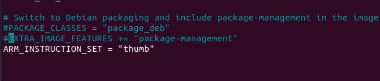
Comment the 2 lines in build/local.conf. You can open this file with your favourite editor like vi, nano or whatever.
nano /path-to-your-yocto-project-project/build/conf/local.conf
Comment these two lines as shown in the screenshot below.
STEP 3:
Build the toolchain SDK using the below command
bitbake meta-toolchain-qt5
STEP 4:
Install the SDK in your host machine.
Cd /path-to-your-yocto-project/build/tmp/deploy/sdk
./fsl-imx-xwayland-glibc-x86_64-meta-toolchain-qt5-cortexa35-imx8qxpc0mek-toolchain-5.10-gatesgarth.sh
The shell script name might be little different depending on your yocto project.

Press Y at every step while installation
You will see the below logs after QT cross compile toolchain installation.
Setting it up…done
SDK has been successfully set up and is ready to be used.
Each time you wish to use the SDK in a new shell session, you need to source the environment setup script e.g .
. /home/akkaadmin/build/imx8/build/tmp/deploy/sdk/y/environment-setup-cortexa35-poky-linuxSTEP 5:
Simply paste the last line in step 4 any terminal session to compile QT. After completing this step, you can compile any QT application for imx boards.
. /opt/fsl-imx-xwayland/4.14-gatesgart/environment-setup-aarch64-poky-linux
Cross-compiling Qt for i.MX boards doesn’t have to be painful — but it does require the right Yocto structure, a clean SDK workflow, and proper environment management. When the toolchain, sysroots, and Qt configurations are aligned correctly, development becomes fast, stable, and production-ready.
In real-world embedded projects, however, things rarely stay this simple. Custom BSP layers, kernel modifications, GPU acceleration (Wayland/X11), OpenGL drivers, secure boot integration, and OTA pipelines can complicate the build process quickly. That’s where experience matters.
At Epteck GmbH, we specialize in:
Embedded Linux & Yocto BSP development
- i.MX6 / i.MX8 platform bring-up
- Qt5 / Qt6 cross-compilation & deployment
- Custom toolchain & SDK optimization
- Secure boot & production-ready build pipelines
- Performance tuning and graphics stack integration (Wayland, DRM, GPU)
Whether you’re building an industrial HMI, medical interface, smart energy system, or automotive display platform; we help teams move from prototype to scalable, maintainable embedded Linux systems.
If you’re facing challenges with Yocto, Qt cross-compilation, i.MX BSP customization, or production deployment, let’s talk.
Book a free consultation with our Embedded Linux experts:
https://calendly.com/epteck/discovery